







Project Information
Country
India
Industry
Manufacturing
Organization Size
51–200 Employees
Solution Area
SAP HANA on Azure and Linux Migration
Products & Services
• Microsoft Azure
• Azure Virtual Machine (SAP HANA certified)
• SUSE Linux Enterprise for SAP Applications
• Premium SSD v2
• Azure Hybrid Benefit
• Azure Monitor
• Azure Backup
• Virtual Network
About the Organization
Shri Laxmi Group runs SAP Business One powered by SAP HANA to manage its core business operations. The system was hosted on a SUSE Linux server in an on-premises environment. That setup was approaching end-of-support. It was still working, but not something the business could rely on long term. Over time, performance tuning started taking more effort. Scaling wasn’t straightforward either.
Challenge
Moving SAP HANA to Azure required careful planning. A few constraints shaped the approach:
- High memory and I/O requirements: SAP HANA workloads depend on consistent performance
- Certification requirements: Infrastructure had to stay within SAP-approved configurations
- End-of-support risk: Existing environment was nearing lifecycle limits
- Limited disaster recovery readiness: No scalable failover setup in place
- Cost considerations: Incorrect sizing could increase long-term costs
None of these were unusual on their own. Together, they made the margin for error smaller.
Solution
IFI Techsolutions implemented a certified SAP on Azure setup aligned with SAP best practices. The focus was simple. Get the foundation right first, then optimize where needed.
- SAP HANA-certified Azure Virtual Machine deployed
- SUSE Linux Enterprise for SAP Applications configured, using Azure Hybrid Benefit
- Premium SSD v2 disks structured across data, log, and shared volumes
- SAP HANA performance validated using HWCCT benchmarking
- 3-year Reserved Instance applied to optimize cost
- Cross-region bandwidth provisioned for future replication scenarios
- Monitoring and backup configured from the start
No major redesign. Just making sure each layer behaved as expected.
Architecture Overview
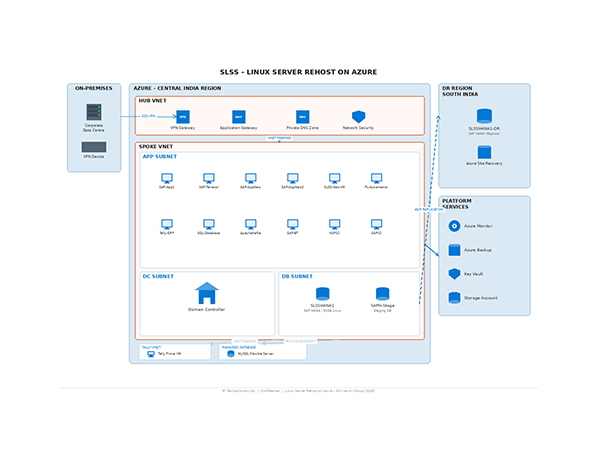
| Area | Implementation |
| Compute | Azure Virtual Machine (SAP HANA certified) |
| Operating System | SUSE Linux Enterprise for SAP Applications |
| Database | SAP HANA |
| Storage | Premium SSD v2 for data, log, and shared volumes |
| Networking | Azure Virtual Network |
| Cost Optimization | Azure Hybrid Benefit and Reserved Instance |
| Monitoring | Azure Monitor |
| Backup | Azure Backup |
Implementation Challenges
Storage layout
The initial disk setup needed adjustment to meet SAP HANA performance expectations. Until that was refined, performance wasn’t consistent.
SUSE configuration
Subscription and system alignment needed correction to match supported SAP configurations.
Network bandwidth planning
Bandwidth estimates had to be revised after testing showed different behavior under peak conditions.
Approach and Resolution
- Refined disk configuration to align with SAP HANA performance patterns
- Validated performance using SAP HWCCT benchmarks before go-live
- Adjusted SUSE configuration to match SAP-supported environments
- Updated network planning assumptions based on observed workload behavior
The changes were incremental. Still, each one mattered.
Impact
After migration, the system ran more consistently.
- Approximately 60% cost reduction through Reserved Instance and Azure Hybrid Benefit
- SAP HANA benchmarks met and exceeded expected performance levels
- High-performance storage configuration supporting database workloads
- Zero data loss during migration
- Environment aligned with SAP certification requirements
Performance didn’t need constant adjustment anymore. That stood out early.
Conclusion
The application stayed the same. What changed was how it behaves day to day. It’s easier to manage now. Performance is more predictable. Costs are easier to track and when changes are needed, they don’t feel heavy.