







What Are The Changes Made by Microsoft in the Enterprise Agreement Criteria?
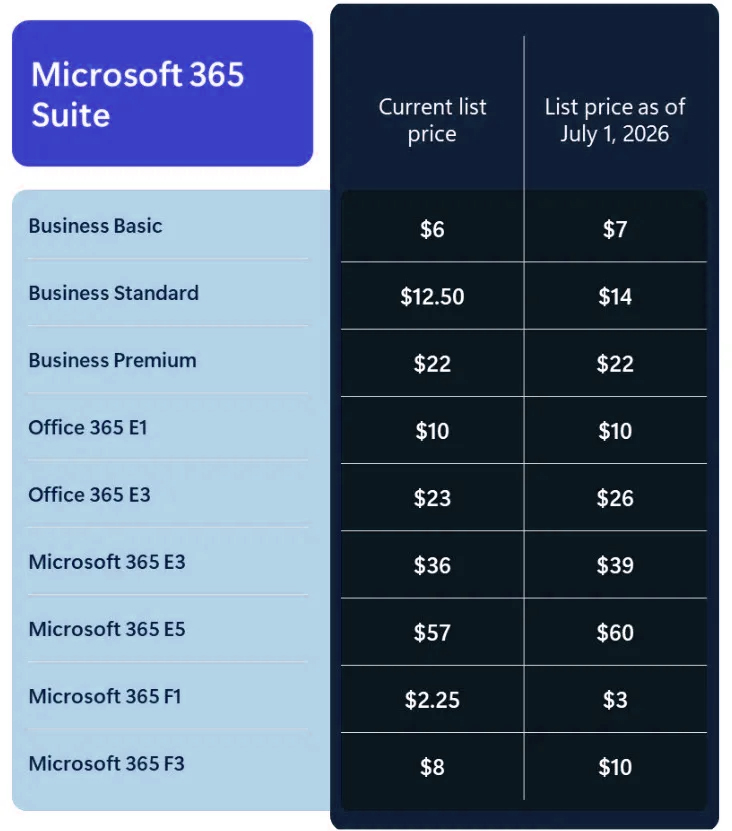
Microsoft has formally declared Microsoft 365 pricing changes for commercial suite subscriptions. These updates provide advanced AI capabilities, stronger security, and improved management features – But they also include price increases starting July 1, 2026 some which will hike as much as 33%.The update impacts key Business, Enterprise, and Frontline suites, and it is tied to new AI, security, and endpoint management capabilities rolling into Microsoft 365 in 2026.
Microsoft says to be updating the Microsoft 365 suite’s business pricing subscriptions that go into effect on July 1, 2026; the adjustments are being shared now to give clients time to make plans.
Important pricing note (Teams and regional adjustments):
- List prices shown are for SKUs that include Teams
- Suites without Teams will also have an equivalent dollar-value increase
- Pricing applies globally with local market adjustments
- Existing customers should contact their account executive or partner
Simplified list-price changes (USD, per user/month)
What Microsoft Will Include in 2026 (and How It Relates to Cost)
Microsoft presents the price change in conjunction with increased AI, security, and management features that will be added to Microsoft 365 products in 2026. Which suites acquire which new capabilities in 2026 is summarized in the matrix below.
Save Before Renewal
Optimize Your Microsoft 365 Licenses Now!
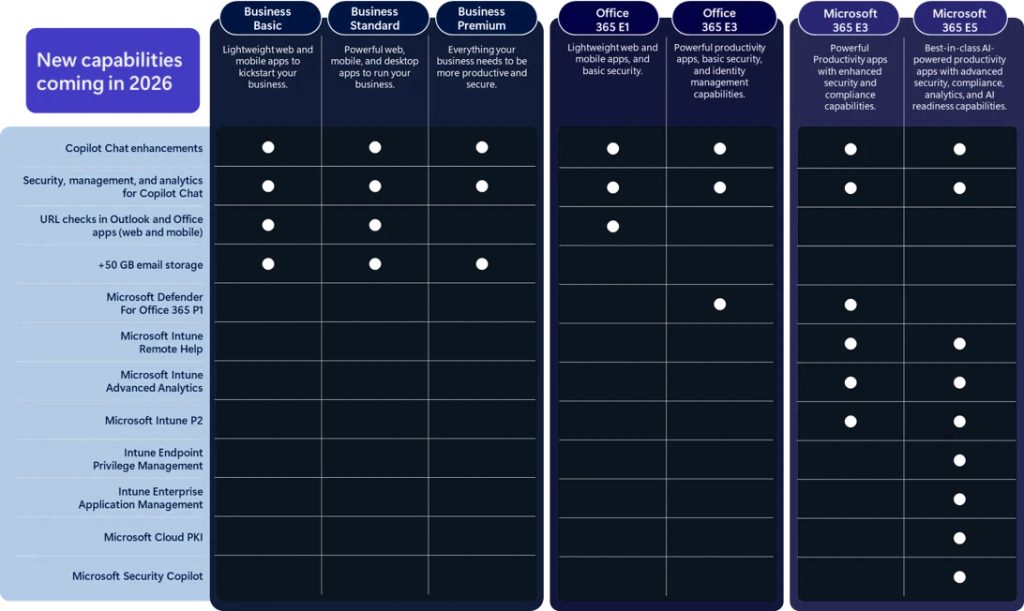
1. AI in the Workflow: Microsoft 365 Apps' Copilot Chat Grows
2. Stronger Security for Core Microsoft Plans
3. Improved Device Management for E3 and E5 Plans
Microsoft is adding several tools to Microsoft 365 E3 and E5 that help IT teams manage company devices and provide support more effectively.
Features added to both E3 and E5:
- Remote Help: A secure tool that helps IT staff to view or control a user’s screen to solve technical issues remotely.
- Advanced Analytics: A system that uses data to find and fix computer performance problems before they affect a user’s work.
- Intune Plan 2: This includes “Tunnel for MAM,” which allows secure access to company data on mobile devices without needing to manage the entire phone, and support for specialized hardware like headsets or large meeting room screens.
Additional features for E5 users only:
- Managed Permissions: This helps employees to perform specific tasks that usually require an “Admin” password, but only for apps that the company has pre-approved.
- Automatic App Updates: A service that automatically keeps non-Microsoft apps (like Zoom or Adobe) up to date with the latest security fixes.
- Cloud Security Keys: A simpler way to manage the digital security certificates used to verify that a device is safe to connect to the company network.
- The Main Lesson: If your company is on an E3 or E5 plan, you should check for any extra software you currently pay for to handle remote support or app updates. Since these features are now being included in your Microsoft subscription, you may be able to stop paying for those separate tools.
4. Security Copilot: Now a Standard Part of Microsoft 365 E5
Microsoft has announced that Security Copilot will now be included for all customers using the Microsoft 365 E5 plan. Before this feature is turned on, administrators will receive a 30-day notice to help them prepare.
How usage is measured: Instead of a flat fee, Microsoft uses “Security Compute Units” (SCUs) to measure how much work the AI does.
Included Amount: For every 1,000 users on an E5 plan, the company gets 400 SCUs per month at no extra cost. (For example, if you have 500 users, you get 200 units).
Maximum Limit: The free amount caps at 10,000 units per month.
Monthly Reset: These units reset at the start of every month; they do not carry over if you don’t use them.
The Main Lesson: Having this tool included makes the E5 plan much more valuable for security teams. However, it is only worth the investment if your team actually uses it for specific tasks, such as investigating security alerts or responding to threats. You should track your usage to see if the included “free” amount is enough for your team’s needs or if you will eventually need to pay for more.
When Does Pricing Apply and Who Is Affected?
Microsoft will apply these price updates starting July 1, 2026.
Global Pricing: These changes apply worldwide, with small adjustments for local markets and currencies.
Nonprofits: Because nonprofit discounts are a set percentage of regular prices, their costs will increase at the same rate as commercial plans.
Next Steps: The new prices will take effect when you renew your subscription after the July 2026 date. Microsoft recommends contacting your account manager or partner for specific details.
Save Before Renewal
Optimize Your Microsoft 365 Licenses Now!
Microsoft Licensing Updates & Advisory – Special Offer
With ongoing Microsoft pricing changes and evolving licensing models, controlling costs has become more important than ever. IFI Techsolutions is offering a complimentary Microsoft license optimization to help you reduce current licensing costs and minimize the impact of upcoming price hikes.
What this offer includes:
- Review of your existing Microsoft 365, Azure, and AI licenses
- Identification of unused, underutilized, or misaligned licenses
- Cost-optimization recommendations to lower monthly and annual spend
- Strategies to mitigate the impact of Microsoft price increases
- Guidance on the right licensing model aligned to your business needs
Ensure you’re paying only for what you use—while staying compliant and future-ready.