







Project Information
Country
United States
Industry
Healthcare Technology
Organization Size
Enterprise
Solution Area
Virtual Desktop Infrastructure (VDI) on Microsoft Azure
Products & Services
• Microsoft Azure
• Azure Virtual Desktop (AVD)
• FSLogix
• Azure Files
• Azure Image Builder
• Microsoft Entra ID
• Azure Monitor
• FortiGate Firewall
About the Organization
RevHC is a fast-growing healthcare revenue integrity company that helps medical providers, hospital systems, and private equity platforms optimize their financial performance and manage complex revenue cycles. Keeping their sensitive data safe during a major growth phase required a new approach. The leadership team decided to pull everyone’s apps and files into a single, centralized hub. With employees logging in from all over the map, it was crucial that remote workers got the exact same reliable experience as someone sitting in the main office.
RevHC wanted to move their daily operations to Azure Virtual Desktop (AVD). However, rolling out a multi-user environment at an enterprise scale is rarely simple, and the team quickly ran into a few critical roadblocks:
Challenge
RevHC wanted to move their daily operations to Azure Virtual Desktop (AVD). However, rolling out a multi-user environment at an enterprise scale is rarely simple, and the team quickly ran into a few critical roadblocks:
- Constant Scaling Blocks:The system kept hitting the ceiling on its Azure vCPU allowance. When more users logged in and the system tried to scale up, deployments failed, leaving users without access.
- Severe Performance Lag: To save on costs, the initial setup used standard virtual machines and allowed up to 15 users per server. When morning traffic spiked, server processors immediately locked at 100 percent. Screens froze, and apps dragged along at a crawl.
- Broken User Profiles:Poorly configured storage caused frustratingly long wait times at the login screen. It even corrupted a few profiles along the way.
- A Major VPN Conflict: The company used a FortiClient SSL VPN. Because AVD is a multi-user environment, if one person logged into the VPN on a server, everyone else on that server was automatically logged in too. When that user logged out, everyone was suddenly disconnected.
- Strict Security Rules: Internal security policies mandated that no session hosts could have a public IP address or be exposed to the open internet.
- Manual IT Work: The IT team was wasting hours manually patching servers and fixing storage limits that filled up without warning.
Solution
IFI Techsolutions stepped in to redesign, stabilize, and secure RevHC’s AVD environment. We didn’t just fix the errors; we overhauled how the infrastructure was managed.
First, we mapped out the actual workload demands. We swapped the underpowered virtual machines for memory-optimized ones and capped the number of users per server so the system actually had room to breathe. To fix the scaling failures, we baked a mandatory 30–40% vCPU buffer into the deployment process—meaning we requested capacity from Microsoft well before the business actually needed it.
We also completely redesigned the storage and network architecture. We moved user profiles to premium storage to guarantee fast logins, set up automated alerts to prevent surprise storage outages, and swapped the problematic SSL VPN for a secure Site-to-Site VPN to fix the user conflict issue. Finally, we automated server updates and locked the entire environment down behind private endpoints.
Architecture Overview
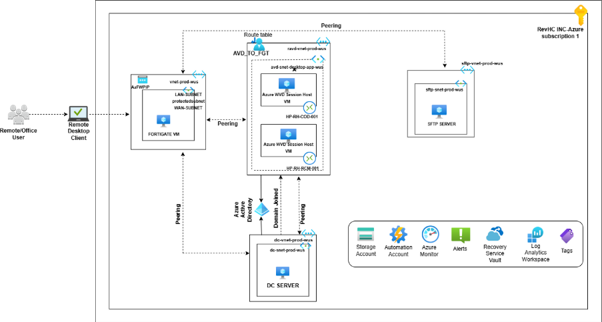
Implementation Challenges
Application Platform: Azure Virtual Desktop (AVD)
Profile Management: FSLogix with Azure Files Premium
Networking & Security: Private Endpoints, Network Security Groups (NSGs), Microsoft Entra ID, FortiGate Site-to-Site VPN
Automation: Azure Image Builder
Monitoring: Azure Monitor and Log Analytics
The vCPU Quota Bottleneck
Whenever traffic surged and the system tried to spin up new session hosts, the process crashed because there were no vCPUs left in that Azure region. Reacting to these errors after the fact was causing too much downtime. To permanently solve it, we completely changed the deployment rules. The team was required to secure a 30 to 40 percent capacity buffer ahead of time, ensuring we never ran out of space when users actually needed it.
Performance vs. Cost
Initially, the environment used D-series virtual machines to save money, with up to 15 users crammed onto a single server. This led to maximum CPU spikes and frozen sessions. We moved the heavy workloads to memory-optimized E-series virtual machines and reduced the maximum session limit by 20–30%. This gave the servers enough headroom for system processes, immediately stopping the lag.
The VPN Multi-User Conflict
Using a FortiClient SSL VPN inside a multi-user AVD host created a massive security and stability risk, where one user’s VPN login or logout affected everyone else on that host. We worked closely with Microsoft and FortiGate teams to redesign the network. We completely removed the SSL VPN from the session hosts and built a Site-to-Site VPN directly between RevHC’s on-premises environment and Azure, eliminating the conflict entirely.
Profile and Storage Blind Spots
FSLogix profiles were taking too long to load, and Azure Files storage was filling up unexpectedly, causing outages. We tuned the FSLogix configurations to Microsoft’s best practices and expanded the storage capacity. We also set up proactive forecasting and alerts at 70%, 85%, and 95% utilization so the IT team could add space before anything broke.
Operational and Security Overhead
The client required zero public internet exposure for their servers. We secured the environment using Private Endpoints, strict Network Security Groups, and Microsoft Entra ID for identity access. To stop the IT team from wasting time on manual server patching, we introduced Azure Image Builder. This allowed us to create “golden images” and fully automate host pool updates and maintenance.
Impact
By redesigning the core architecture and moving to a proactive management model, we completely turned RevHC’s AVD environment around.
Key outcomes included:
- Zero Scaling Failures: With proactive vCPU quota management, the system now scales seamlessly under heavy user loads.
- High-End Performance: Logins are much faster, and users no longer experience application freezing or session lag during peak hours.
- A Locked-Down Environment: The entire infrastructure operates without a single public IP address, heavily reducing the attack surface while maintaining strict compliance.
- No More Network Conflicts: The shift to a Site-to-Site VPN stabilized network connectivity and removed the massive multi-user login risks.
- Massive Time Savings: Automated patching and golden image deployments removed hours of manual labor from the internal IT team’s weekly schedule.
Conclusion
IFI Techsolutions delivered a highly secure, enterprise-grade Azure Virtual Desktop environment for RevHC. We removed the roadblocks tied to poor capacity planning, undersized servers, network conflicts, and manual maintenance.
We matched the workloads with the correct server sizes, locked down the network, and built automation into their daily routines. Because of these changes, RevHC finally owns a cloud desktop environment they can trust. Things run smoothly, the monthly billing is completely predictable, and the internal IT crew can finally spend their week supporting actual business goals instead of fixing broken servers.