







Project Information
Country
India
Industry
Media and Gaming
Organization Size
Mid-sized enterprise
Solution Area
Azure Virtual Desktop (AVD) Deployment
Products & Services
• Microsoft Azure
• Azure Virtual Desktop
• GPU-enabled Virtual Machines
• FSLogix
• Azure Files
• Azure Monitor
• Log Analytics
• Azure Virtual Network
• Network Security Groups (NSGs)
About the Organization
Natcorner Studios sought a robust remote desktop setup capable of running the heavy graphics applications their creative teams rely on daily. Staff members had to securely connect to their workspace from various geographic regions, but keeping performance high and lag low was non-negotiable.
Because their standard daily tasks involve heavy rendering, the infrastructure absolutely needed serious GPU power to maintain responsiveness. The older remote access tools they had in place simply couldn’t keep up with that volume of graphical processing or the company’s growing scale. To resolve this bottleneck, IFI Techsolutions stepped in to build an Azure Virtual Desktop ecosystem that prioritized raw performance, easy scaling, and a centralized management hub.
Challenge
The organization needed a virtual desktop platform that could support demanding graphics workloads while remaining stable for multiple concurrent users.
Several operational and infrastructure challenges affected the deployment process:
- GPU-enabled virtual machines required higher regional Azure vCPU quotas
- Virtual machine provisioning failed because sufficient quota capacity was unavailable during deployment
- User profiles were not retained after logoff before FSLogix configuration was completed
- Gaming and rendering applications required smoother frame delivery and lower latency
These issues affected both deployment timelines and user experience expectations.
Solution
We implemented a secure and scalable Azure Virtual Desktop environment aligned with Microsoft best practices.
The deployment included:
- Azure Virtual Desktop host pools with GPU-enabled session hosts
- FSLogix profile containers for persistent user sessions
- Azure Files for centralized profile storage
- Azure Virtual Network and NSGs for secure connectivity
- Azure Monitor and Log Analytics for operational monitoring
Architecture Overview
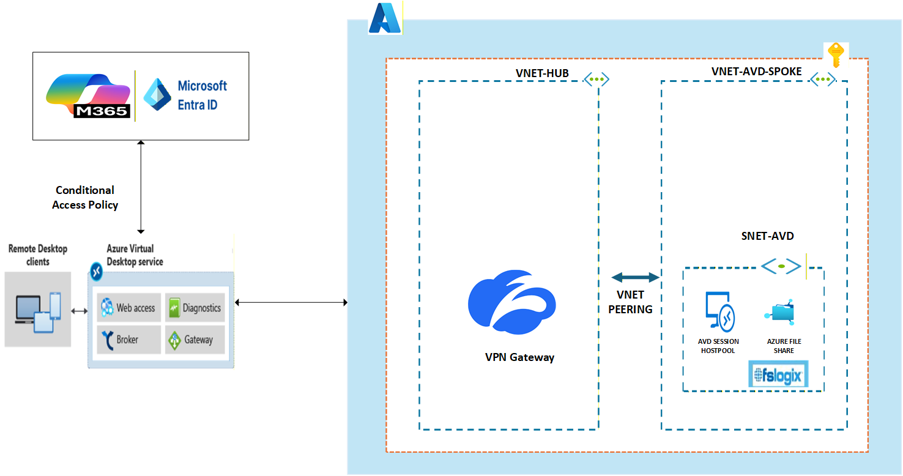
| Area | Implementation |
| Virtual Desktop Platform | Azure Virtual Desktop |
| Session Hosts | GPU-enabled Azure Virtual Machines |
| User Profiles | FSLogix Profile Containers |
| Profile Storage | Azure Files |
| Networking | Azure Virtual Network and NSGs |
| Monitoring | Azure Monitor and Log Analytics |
| Identity and Access | Azure-integrated authentication |
Implementation Challenges
vCPU Quota Limitations
The deployment required GPU-based session hosts. However, the Azure subscription did not initially have sufficient regional vCPU quota available for the required virtual machine sizes.
Because of this limitation, provisioning and scaling operations failed during deployment.
FSLogix Profile Configuration
At the beginning of the project, FSLogix implementation requirements were not finalized. As a result, user data was not retained after users logged off from their AVD sessions.
This created an inconsistent user experience and increased the risk of data loss within user environments.
Application FPS Limitations
The client observed lower frame rates while running graphics-intensive and gaming-related applications within Azure Virtual Desktop.
Testing confirmed that Azure Virtual Desktop supports rendering frame rates of up to approximately 30 FPS for application delivery scenarios. This platform limitation affected the expected user experience for workloads targeting higher frame rates.
Approach and Resolution
We addressed the deployment and operational issues through a phased stabilization approach.
Infrastructure and Quota Planning
- Raised proactive Azure vCPU quota increase requests with Microsoft
- Added quota validation as a mandatory pre-deployment activity
- Planned additional capacity buffers before onboarding and scaling operations
FSLogix Configuration and Profile Stability
- Configured FSLogix using Microsoft-recommended best practices
- Enabled profile container management for persistent user sessions
- Implemented monitoring for profile mount performance and errors
Monitoring and Operational Visibility
- Enabled Azure Monitor and Log Analytics
- Established continuous monitoring for CPU, memory, session health, and user experience metrics
- Performed regular environment validation and performance reviews
Application Performance Alignment
- Validated platform rendering limitations with the client
- Aligned workload expectations based on Azure Virtual Desktop capabilities
- Supported the client in identifying application-side optimization areas
Each adjustment improved overall platform stability and operational reliability.
The changes were incremental. Still, each one mattered.
Impact
After deployment and stabilization, Nat Corner Studios achieved a more reliable and manageable remote desktop environment.
Key outcomes included:
- Successful deployment of GPU-enabled Azure Virtual Desktop infrastructure
- Persistent user sessions through FSLogix profile management
- Improved operational monitoring and environment visibility
- Better scalability planning for future user growth
- Reduced provisioning risks through proactive quota management
- Stable and secure remote access for distributed employees
The environment became easier to monitor, maintain, and scale as business requirements evolved.
Best Practices Established
The project also established deployment standards for future Azure Virtual Desktop implementations:
Capacity and Quota Management
- Validate vCPU quotas before deployments and scaling activities
- Maintain surplus capacity for failover and VM resizing scenarios
- Forecast growth and monitor quota utilization continuously
Host Pool and VM Planning
- Select VM sizes based on workload requirements and user concurrency
- Separate host pools based on workload categories and performance needs
FSLogix Operations
- Use Microsoft-recommended FSLogix configurations
- Monitor profile performance continuously
- Use Azure Files Premium for optimized profile storage performance
Monitoring and Readiness
- Enable Azure Monitor and Log Analytics from the start
- Track session health, infrastructure performance, and user experience metrics
- Conduct regular capacity and performance assessments
Conclusion
IFI Techsolutions successfully implemented a secure and scalable Azure Virtual Desktop environment for Nat Corner Studios. The deployment addressed critical operational challenges related to GPU infrastructure, user profile persistence, and resource planning.
By improving quota management, implementing FSLogix correctly, and strengthening monitoring capabilities, the organization gained a more stable remote working environment for graphics-intensive workloads. The final environment provided centralized management, reliable remote access, and a stronger operational foundation for future growth.