







Project Information
Country
United States
Industry
Financial Services
Organization Size
51–200 Employees
Solution Area
Windows Server Migration and Infrastructure Modernization
Products & Services
• Microsoft Azure
• Azure Virtual Machines
• Azure Front Door
• Azure Virtual Network
• Microsoft Defender for Cloud
• Azure Monitor
• Log Analytics
• Azure Backup
• Azure Migrate
• VPN Gateway
About the Organization
Challenge
The requirement was straightforward on paper: moving to Azure without disrupting transactions. In practice, it was more involved.
-
- Scaling lagged demand Infrastructure changes were not keeping up with workload spikes
- No global entry point Traffic routing was not optimized across regions
- Operational load was high Monitoring, patching, and backup processes were still largely manual
- Database workloads were under pressure SQL Server needed better sizing and resource control
And one constraint sat above everything else. The platform had to stay live during migration.
Solution
IFI Techsolutions moved the environment to Azure using a lift-and-shift approach. The focus was not to redesign everything upfront, but to stabilize first and then improve where needed. Here’s how the solution came together:
- Seven Windows Server VMs migrated using Azure Migrate with continuous replication
- Azure Front Door introduced as the global entry point, with WAF and SSL termination
- Network split into application and database subnets, with controlled traffic between them
- SQL Server deployed on memory-optimized Azure VMs, backed by Premium SSD storage
- Monitoring and logging centralized through Azure Monitor and Log Analytics
- Security posture strengthened using Defender for Cloud
- Backup configured early, not as a later step
Architecture Overview
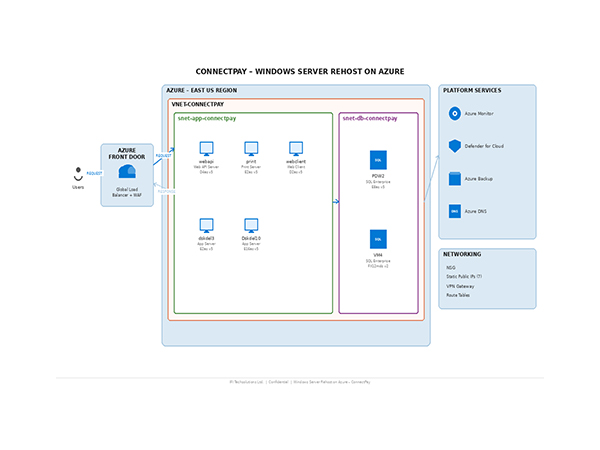
Area | Implementation |
Compute | 7 Azure Virtual Machines across D, E, and FX series |
Application Layer | Windows Server workloads hosting web and transaction services |
Database Layer | SQL Server Enterprise on high-memory Azure VMs |
Traffic Management | Azure Front Door with WAF and SSL |
Networking | Virtual Network with separate App and DB subnets |
Connectivity | VPN Gateway for secure hybrid access |
Storage | Standard SSD and Premium SSD managed disks |
Monitoring | Azure Monitor with Log Analytics |
Security | Microsoft Defender for Cloud |
Backup | Azure Backup for VMs and SQL workloads |
Implementation Challenges
Front Door configuration
During initial validation, backend health checks were not consistent. The issue turned out to be timing. The probes were firing before the application was fully ready, which led to intermittent 502 responses.
SQL Server cost and sizing
Licensing needed a closer look. PAYG versus BYOL was not just a pricing decision. It affected how the environment would scale over time. VM sizing also had to be adjusted to avoid overspending while keeping performance stable.
Network security rules
The first set of NSG rules was too tight. Some application calls simply didn’t go through. This only became clear once real traffic started flowing through the system.
Approach and Resolution
Adjusted health probe timing and routing behavior to align with application readiness
Revisited SQL licensing and VM sizing, based on actual workload patterns rather than initial estimates
Updated NSG rules after mapping real communication between application and database tiers
Ran staged validation cycles before final cutover
No single fix solved everything. It was a series of small adjustments that stabilized the system.
Impact
Once the migration was settled, the improvements were clear.
- All 7 VMs moved without downtime, and transactions continued as expected
- Traffic routes improved, especially for users accessing the platform from different regions
- Security became easier to manage, with centralized visibility through Defender for Cloud
- System availability improved, backed by Azure infrastructure and SLA
- Monitoring is now consistent, with logs and metrics available in one place
- Backup is automated, reducing dependency on manual processes
The environment is not just in Azure. It’s easier to operate.
Conclusion
Moving to Azure did not change how the application works. It changed how it runs. The platform is more predictable now. Scaling is simpler. Security is easier to enforce. The team spends less time managing infrastructure and more time focusing on the application itself. That shift matters more than the migration itself.