






Are you using Azure?
Still managing your billing directly?
As your cloud use grows, understanding bills, controlling costs, managing subscriptions, and finding the right support can become more difficult. We are here to make these challenges easier to manage.
By moving from Azure Pay-As-You-Go to CSP, you can gain clearer billing, better cost visibility, simpler subscription management, expert guidance, and one reliable point of contact for support. This guide explains how the move works, what stays the same, and how to choose the right path for your business. Under CSP, a Microsoft partner takes a more active role in managing the Azure relationship. The partner can handle billing, manage subscriptions, provide additional services, and act as the first point of contact for support.
At IFI Techsolutions, we recommend starting with one practical question: Can your Azure subscription move through a supported billing ownership transfer, or will its resources need to move to a CSP subscription? The answer matters because a billing-level transfer can keep the existing Azure environment in place, while the resource-move path requires more technical planning. This guide explains the checks involved in each route so you can understand what the transition may require for your Azure environment.
What Is Azure Pay-As-You-Go?
Azure Pay-As-You-Go, often called Azure PAYG, is a flexible cloud consumption model where organizations pay based on the Azure resources they use. It works well when businesses want to start quickly, avoid upfront infrastructure investment, and scale cloud usage based on demand. Microsoft’s Azure pricing page highlights pay-as-you-go flexibility, cost estimation tools, and cost management resources for Azure customers.
For smaller or early-stage Azure environments, PAYG can be simple enough. But over time, cloud usage can become harder to manage. Finance teams may want clearer invoices. IT leaders may want better subscription visibility. Cloud teams may need help with optimization, governance, and support. When these needs grow, organizations often begin comparing Azure PAYG with Azure CSP.
What Is Azure CSP?
Azure CSP, or Cloud Solution Provider, is a Microsoft partner-led model for buying and managing Microsoft cloud services. Microsoft states that CSP enables partners to own the customer lifecycle, set price and terms, directly bill customers, provision and manage subscriptions, add value-added services, and serve as the first point of contact for support.
Under the modern CSP model, customers typically use the Azure plan. Microsoft says that when a partner purchases an Azure plan for a customer under the Microsoft Customer Agreement, the customer gets access to the full catalogue of Azure services at pay-as-you-go rates, and a partner can have multiple Azure subscriptions under one Azure plan.
In simple terms, CSP does not mean you stop using Azure. It means your Azure commercial relationship, billing support, and partner-led services are managed through an authorized Microsoft partner.
Azure PAYG vs CSP: What Changes?
Before choosing a route, it helps to understand what actually changes when you move from direct Azure billing to a CSP model. The Azure platform remains the same, but the billing relationship, support route, and day-to-day management experience can change significantly.
Area | Azure Pay-As-You-Go | Azure CSP |
Billing relationship | Usually managed directly with Microsoft | Managed through a CSP partner |
Support route | Based on customer’s Microsoft support plan | CSP partner becomes the main support contact |
Cost management | Customer manages visibility and optimization directly | Partner can support reporting, budgets, reviews, and optimization |
Subscription guidance | Customer-led | Partner-assisted |
Governance support | Internal responsibility | Can be supported through partner expertise |
Commercial flexibility | Direct Azure purchasing model | Partner-led billing, terms, and value-added services |
For IT and finance teams, this can simplify day-to-day cloud management because billing questions, subscription changes, cost reviews, and support conversations move through one partner-led route.
Ready to get started?
Move from Azure PAYG to CSP with Confidence!
What Stays the Same During a Supported Billing-Level Transition?
This is the part buyers care about most. In supported billing transitions, IFI Techsolutions positions the move as a billing-level change where the tenant, users, data, apps, and workloads stay where they are. In other words, the customer does not need to rebuild the Azure environment simply to change the billing relationship.
However, this statement needs to be managed carefully. Microsoft’s product transfer guidance says most billing ownership transfers do not change the service tenant and do not cause downtime, but transfer support varies by product and agreement type. Microsoft also states that not every product can be transferred from one type to another and only supported product transfers are documented.
The safest way to think about it is simple:
For supported billing-level transitions, your Azure environment can remain in place while the billing relationship changes. If your subscription is not eligible for billing transfer, a resource-move approach may be required.
The Two Main Azure PAYG to CSP Migration Paths
Azure PAYG to CSP migration usually follows one of two paths: a supported billing ownership transfer or a resource move into a CSP subscription. The right route depends on subscription eligibility, agreement type, tenant setup, and the resources involved.
- Supported Billing Ownership Transfer
A billing ownership transfer changes who owns the billing relationship for the Azure subscription. In supported scenarios, this does not require moving workloads, changing users, or rebuilding resources. Microsoft states that most billing ownership transfers do not change the service tenant or cause downtime.
Microsoft’s subscriber-to-CSP transfer guidance says CSP direct bill partners certified as Azure Expert Managed Services Providers can request transfers for eligible customer subscriptions, and customers must have accepted a Microsoft Customer Agreement and purchased an Azure plan with the CSP program.
This path is usually preferred when it is available because it keeps the technical environment stable while changing the commercial and support model.
- Resource Move into a CSP Subscription
If an Azure subscription is not eligible for billing transfer, Microsoft says the subscriber must transfer resources from the source subscription to CSP subscriptions. This is a more technical path and needs careful planning.
Microsoft’s Azure Resource Manager guidance says that when resources are moved across subscriptions, both subscriptions must be in the same Microsoft Entra tenant. It also states that resources must support move operations, destination providers may need registration, quotas should be checked, and dependent resources should be moved together.
Resource moves may also affect operations. Microsoft notes that during a move, source and target resource groups are locked, although existing resources remain operational. Microsoft also warns that moving Azure resources between subscriptions might result in service downtime depending on the resources involved. Use the framework below as a visual guide for this decision.
A practical decision framework for choosing between a billing-level transfer and a resource-move path.
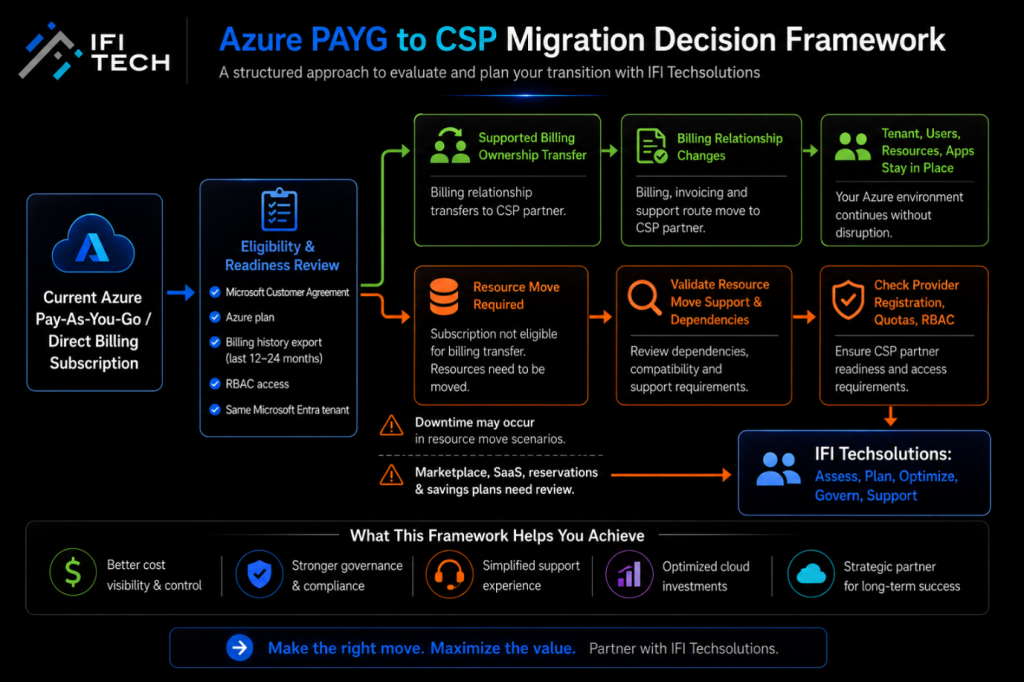
Azure PAYG to CSP Readiness Checklist
Before moving from Azure Pay-As-You-Go to CSP, review these areas:
- Confirm agreement and Azure plan readiness. Microsoft says Azure plan purchase under CSP requires customer acceptance of the Microsoft Customer Agreement.
- Export cost and billing history. Microsoft advises customers to download or export cost and billing information before starting a transfer because billing and utilization information does not transfer with the subscription.
- Check subscription eligibility. Some subscriptions can transfer billing ownership; others require resource movement.
- Validate Microsoft Entra tenant alignment. Microsoft says cross-subscription resource moves require source and destination subscriptions to be in the same Microsoft Entra tenant.
- Review RBAC and access. Microsoft states that role assignments may not move in some resource-move scenarios and may need to be recreated.
- Check resource move support. Not all Azure resources support moves operations, so each workload should be reviewed before planning a move.
- Review Marketplace, SaaS, reservations, and savings plans. Microsoft notes that Marketplace products, SaaS subscriptions, reservations, and savings plans can have different transfer behaviour.
- Plan post-move validation. Resource IDs can change during resource moves, so scripts, dashboards, templates, and monitoring references may need updates.
Ready to get started?
Make Your Azure Investment Work Smarter!
Cost Management After Moving to CSP
One of the strongest reasons to evaluate CSP is better cost management discipline. Microsoft says Cost Management is available for direct partners that onboard customers to the Microsoft Customer Agreement and purchase an Azure plan. CSP partners can use Cost Management to understand invoiced costs by customer, subscription, resource group, resource, meter, service, and other dimensions.
Customers can also use Cost Management features when enabled by their CSP partner, provided they have the right Azure RBAC access and the cost visibility policy is enabled. Microsoft also supports budgets, alerts, cost analysis, and cost exports in this model.
That said, CSP should not be positioned as an automatic discount. IFI’s own Direct to CSP material rightly avoids guaranteeing discounts and says pricing depends on products, region, term, billing cycle, license quantity, purchase history, and promotion conditions.
A better way to look at CSP is this:
CSP can improve cost visibility, billing support, and optimization conversations. Any savings opportunity should be confirmed after an eligibility and pricing review.
Governance, Support, and Operational Control
Azure PAYG to CSP migration should also be treated as a governance opportunity. A good CSP conversation should include subscription structure, tagging, budgets, access controls, renewal planning, support routes, and cloud optimization.
Microsoft’s Cost Management guidance supports this approach by enabling cost analysis, budgets, alerts, exports, and customer cost visibility when configured by the CSP partner. Microsoft’s CSP support guidance also makes the support relationship clear: CSP customers contact the partner for support, and the partner manages diagnosis and resolution within support boundaries.
IFI Techsolutions can differentiate this service by positioning CSP as more than a billing change. The value is in the full support model: billing assistance, license guidance, Azure optimization, practical cost reviews, subscription management, and 24/7 expert support. This makes IFI Techsolutions a CSP partner that can help customers manage both the commercial and operational sides of Microsoft cloud adoption.
Common Limitations to Plan For
Azure PAYG to CSP migration is usually manageable, but it should not be treated as a simple switch. The right approach depends on billing transfer eligibility, agreement type, resource dependencies, access model, and the level of planning required for each workload.
First, billing history does not move with the subscription, so cost and usage data should be exported before transfer. Second, not every product transfer is supported, and some scenarios require manual resource movement. Third, resource moves can require same-tenant alignment, provider registration, quota checks, dependency planning, RBAC review, and post-move updates.
Finally, support plans, Marketplace products, SaaS subscriptions, reservations, and savings plans may require separate review depending on the agreement and transfer path. This is why an assessment-first approach is the safest path.
How IFI Techsolutions Helps
IFI Techsolutions helps organizations evaluate Azure PAYG to CSP migration with a practical, assessment-led approach. The goal is to help you understand what can move, what stays the same, what pricing options may be available, and what technical checks are needed before any change begins.
For supported billing transitions, IFI’s messaging confirms that the tenant, users, data, apps, and workloads stay where they are. For scenarios that require deeper planning, IFI can help review Azure usage, subscription structure, cost visibility, governance needs, and support requirements before recommending the right path.
Instead of treating CSP as only a new invoice, IFI Techsolutions helps customers use the move as an opportunity to improve billing clarity, subscription control, support access, and Azure cost management.
Ready to get started?
Your Azure PAYG to CSP Journey Starts Here!
Conclusion
Azure PAYG to CSP migration can be a smart move for organizations that want clearer billing, stronger support, better cost visibility, and partner-led Azure guidance. But the move should start with an eligibility review, not assumptions, because the right path can vary from one subscription to another.
For supported billing ownership transfers, the transition may be commercial. For unsupported scenarios, a resource-move plan may be required. The right path depends on your subscription type, agreement, resources, tenant setup, access model, and cost-management needs.
IFI Techsolutions helps businesses evaluate that path clearly. If your team is currently using Azure Pay-As-You-Go and wants to understand whether CSP is the right next step, start with a practical review of eligibility, pricing, billing history, resource dependencies, and support expectations.
Frequently Asked Questions
What is Azure PAYG to CSP migration?
Azure PAYG to CSP migration is the process of moving from direct Azure Pay-As-You-Go billing to a partner-led Cloud Solution Provider model. In CSP, an authorized Microsoft partner can support billing, subscription management, support, and value-added services.
Is Azure Pay-As-You-Go to CSP a tenant migration?
Not always. For supported billing-level transitions, IFI Techsolutions states that the tenant, users, data, apps, and workloads stay where they are. If billing transfer is not supported, Microsoft says resources may need to be moved into CSP subscriptions.
Will there be downtime?
Do not assume downtime or no downtime without assessment. Microsoft says most billing ownership transfers do not cause downtime. However, Microsoft also states that moving Azure resources between subscriptions might result in service downtime depending on the resources involved.
Why is Microsoft Fabric important for enterprise AI adoption?
Microsoft Fabric helps organizations connect, manage, and analyze data through a unified platform. OneLake provides a common data foundation that can reduce silos and duplication. Better governed data gives AI solutions a more consistent and reliable source of business information.
What should we check before moving to CSP?
Check subscription eligibility, Microsoft Customer Agreement status, Azure plan readiness, billing history exports, Microsoft Entra tenant alignment, RBAC access, resource move support, quotas, Marketplace products, SaaS subscriptions, reservations, and savings plans.
Who provides support after moving to CSP?
Microsoft says CSP customers cannot create support requests themselves and must contact their CSP partner for support. The partner is expected to receive support requests, diagnose issues, and resolve issues within support boundaries.
Can moving to CSP reduce Azure costs?
CSP can support better cost visibility, budget tracking, alerts, reporting, and optimization reviews. However, savings are not guaranteed. IFI’s Direct to CSP guidance says pricing depends on eligibility, products, region, terms, billing cycle, license quantity, and promotion conditions.